

Related Articles









Mero Kitta App Download, Login, Map Download Guide in Nepal (2026)
Mero Kitta App Download, Login, Map Download Guide in Nepal (2026)
Land-related services in Nepal are becoming digital. Earlier, people had to visit the Survey Office (नापी कार्यालय), wait in long lines, and spend a lot of time to get land maps and records. Now, with Mero Kitta Online, you can access many land services directly from your home in simple steps.
If you want to download a land map, check land details, or apply for survey-related services, the Mero Kitta App is one of the easiest solutions available in Nepal.
In this guide by Nepinsights, you will learn everything about mero kitta online, mero kitta app download, mero kitta login, mero kitta map, and how to use mero kitta step by step.
What is Mero Kitta Online?
Mero Kitta Online is a digital land service launched by Nepal's Survey Department (नापी विभाग). It allows citizens to access land-related information online without visiting government offices.
The system is connected with Nepal Land Information System (NELIS), which stores official land records and cadastral maps digitally.
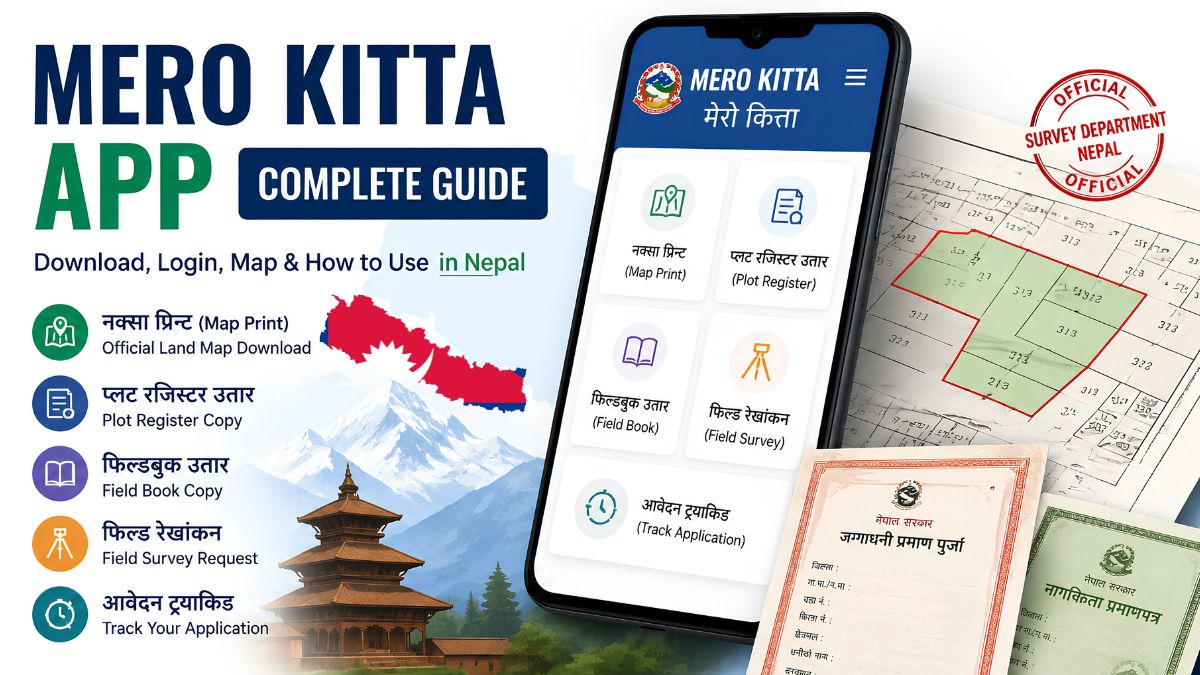
Using Mero Kitta, citizens can:
- Download land maps
- View plot information
- Get plot register copies
- Access field book records
- Apply for field surveys
- Track application status online
This service saves time, reduces unnecessary visits to government offices, and makes land services more transparent.
Mero Kitta Map: What Can You Get?
The most popular service on the platform is the Mero Kitta Map service.
A cadastral map (नक्सा) shows:
- Land boundaries
- Plot shape
- Plot size
- Neighboring plots
- Plot location
The map is useful for:
- Buying and selling land
- Home construction
- Bank loans
- Legal verification
- Land ownership confirmation
Services Available in Mero Kitta
1. Map Print (नक्सा प्रिन्ट)
Download and print official land maps online.
2. Plot Register Print (प्लट रजिस्टर उतार)
Get records related to your land parcel.
3. Field Book Print (फिल्डबुक उतार)
Access survey details stored in government records.
4. Field Survey Request (फिल्ड रेखांकन)
Apply online for land measurement and boundary verification.
5. Application Tracking
Check the status of your application anytime.
Mero Kitta App Download Process

Many users search for mero kitta app download to access services from their smartphones.
Follow these steps:
- Open Google Play Store.
- Search for Mero Kitta.
- Find the official app published by the Survey Department of Nepal.
- Tap Install.
- Wait for the installation to complete.
- Open the app and start using the service.
Using the app is more convenient because you can track requests directly from your mobile phone.
👉Mero Kitta App Download Link: Click Here
How to Use Mero Kitta Online?
If you're wondering how to use mero kitta, follow the simple steps below.
Step 1: Prepare Required Documents
Before applying, keep these documents ready:
- Land Ownership Certificate (लालपुर्जा)
- Citizenship Certificate (नागरिकता)
Make sure:
- Documents are clear and readable.
- File size is below 1 MB.
- Scanned copies are in PDF or image format.
Step 2: Visit the Official Portal
Open the official Mero Kitta website and select the service you need.
Step 3: Select Location Details
Choose:
- Survey Office (नापी कार्यालय)
- District
- Municipality/Rural Municipality
- Ward Number
Step 4: Enter Land Information
Fill in:
- Map Number (नक्सा नम्बर)
- Sheet Number
- Plot Number (कित्ता नम्बर)
Step 5: Enter Owner Information
Provide:
- Full Name (as written in Lalpurja)
- Mobile Number
Step 6: Upload Documents
Upload:
- Lalpurja copy
- Citizenship copy
Step 7: Verify with OTP
After submission, you will receive an OTP on your mobile phone.
Enter the OTP to complete verification.
Step 8: Wait for Approval
The Survey Office will verify your information.
Once approved, you will receive an SMS notification.
Step 9: Pay Government Fee
Pay the required revenue online through available payment methods.
Step 10: Download Your Map
After successful payment, you can download the map.
Remember: The download link is usually active for only seven days.
Mero Kitta Login Explained
Many users are confused about mero kitta login. The login section on the homepage is mainly for:
- Banks
- Financial institutions
- Municipal offices
- Government organizations
Do Ordinary Citizens Need Mero Kitta Login?
No. Regular citizens do not need a permanent username or password. Instead, they can:
- Fill out the application form
- Verify identity using OTP
- Access services without creating an account
Therefore, most users can use the platform without a separate mero kitta login account.
🔥Read This: Nepal Government Ready with Its New Message App Like Whatsapp
Tips for Successful Mero Kitta Application
To avoid rejection, follow these tips:
1. Upload Small Files
Keep all uploaded files below 1 MB.
2. Match Names Correctly
The name entered must exactly match the name on the Lalpurja.
3. Download Files Immediately
Once approved, save your documents as soon as possible.
4. Double-Check Plot Numbers
Wrong plot numbers can cause application rejection.
Frequently Asked Questions (FAQs)
Is Mero Kitta Online Free?
The application process of Mero Kitta Nepal is online, but government service charges apply depending on the service requested.
Do I Need a Mero Kitta Login Account?
No. Individual users can access Mero Kitta services using OTP verification.
What Happens If My Download Link Expires?
You may need to submit a new application and pay the required fee again.
Why Can't I Find My Plot Online?
Some areas of Nepal have not yet been fully digitized. In such cases, visit your local Survey Office.
Is the Mero Kitta Map Valid for Bank Loans?
Yes. Maps obtained through the official government system are generally accepted by banks and government offices.
Conclusion
The Mero Kitta App and Mero Kitta Online platform have made land-related services easier and faster in Nepal. Whether you need a Mero Kitta Map, want information about Mero Kitta Login, or are searching for How to Use Mero Kitta, the platform helps citizens access important land records without visiting government offices.
Before applying, make sure your documents are clear, file sizes are within limits, and all information matches your official records. This will help ensure a smooth and successful application process.
As Nepal continues to digitize government services, Mero Kitta remains one of the most useful online platforms for landowners across the country. Thanks for reading till the end don't forget to follow us on facebook and go to Nepinsights home page to read more articles.
React to this post
Related Articles