
Related Articles







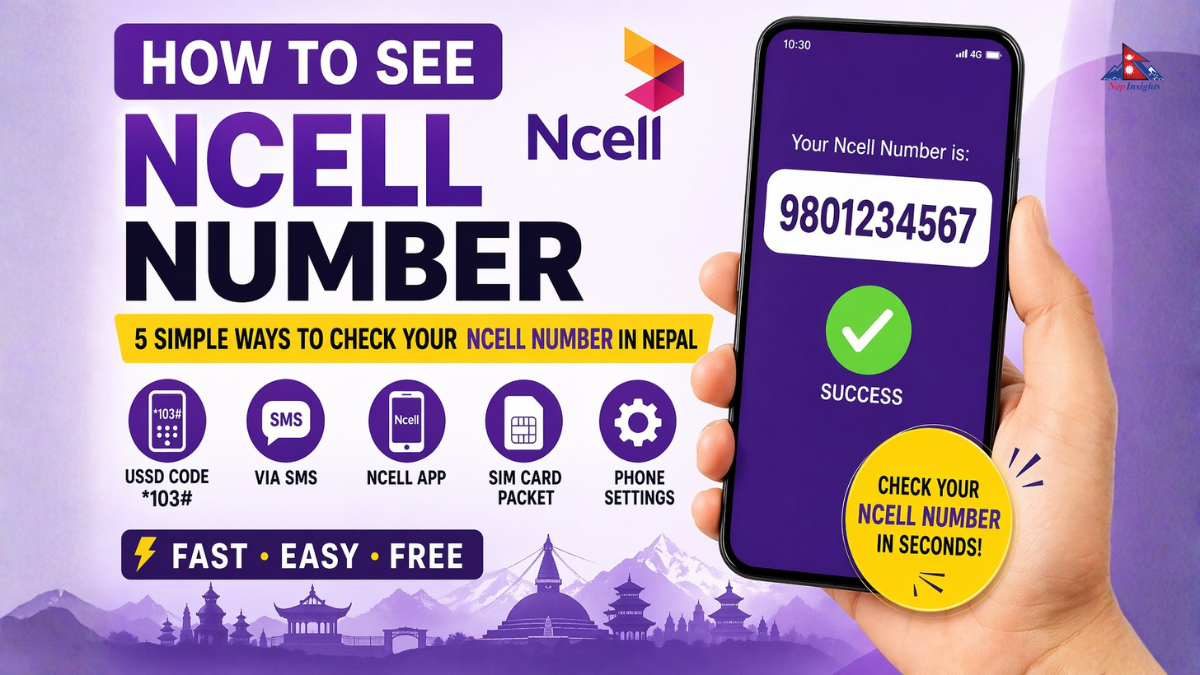
How to See Ncell Number: 5 Simple Ways to Check Your Ncell Number in Nepal
How to See Ncell Number: 5 Simple Ways to Check Your Ncell Number in Nepal
Do you have Ncell SIM card and you forgot your number? Don't worry, you are not alone! Many people in Nepal forget their mobile numbers because we usually don't call ourselves.
In this blog, we will show you exactly how to see Ncell number in just a few seconds. We have listed all the easiest methods, including the NCELL number check code, using the Ncell app, and other simple tricks.
Why You Might Need to Check Your Ncell Number
Before we dive into the steps, let’s look at why knowing your Ncell number is important:
- To Recharge Your Account: You need the correct number to buy top-ups or data packs.
- To Share with Friends: If you want someone to call you, you need to give them your number.
- For Online Forms: Many apps and websites in Nepal require a mobile number for registration.
- To Use Banking Services: Most banks in Nepal link your account to your mobile number.
Now, let's look at the different ways to check NCELL number.
👉 Ncell Introduces Affordable ‘Pahilo SIM’ Package for SEE Students with Data, Calls & More
1. Use the NCELL Number Check Code (USSD Code)
The fastest and easiest way to find my Ncell number is by using a USSD code. This method is completely free and works even if you have zero balance.
Method A: Dialing *103#
This is the most common Ncell USSD code used in Nepal.
- Open the "Phone" or "Dialer" app on your mobile.
- Type *103#.
- Press the call button.
- Your mobile number will appear on the screen immediately. It usually starts with 980, 981, or 982.
Method B: Dialing *906#
If the first code doesn't work for some reason, Ncell provides another code.
- Dial *906# from your Ncell SIM.
- Your number will pop up on the screen.
2. Check Ncell Mobile Number Nepal via SMS
If you are unable to use USSD codes, you can also try sending an SMS. While Ncell doesn't have a direct "SMS to check number" service like some other carriers, there is a simple workaround.
- In your message box, type any text (like "Hi").
- Send it to a friend or family member sitting next to you.
- Your number will show up on their phone screen.
3. Find My Ncell Number Using the Ncell App
If you have a smartphone and a data connection (or Wi-Fi), using the Ncell App is the best way to manage your SIM.
- Download the Ncell App from the Google Play Store or Apple App Store.
- If you have already logged in once, your number will be displayed right at the top of the home screen.
- The app also shows your current balance, data usage, and active offers.
The Ncell App is very helpful because it helps you check NCELL number and manage your account without remembering any complicated codes.
4. Check Your SIM Card Packet (Starter Pack)
When you buy a new Ncell SIM card in Nepal, it comes in a plastic frame or a paper envelope.
- Look at the back of the SIM card holder (the big plastic card from which you popped out the small SIM).
- Your mobile number is usually printed there next to the barcode.
- If you still have the "Starter Pack" kit, the phone number is printed on the cover.
5. Check Phone Settings (Android & iPhone)
Sometimes, your phone automatically saves your SIM number in the settings. You don't even need to dial any Ncell number check code.
For Android Users:
- Go to Settings.
- Scroll down and tap on About Phone (or Phone Identity).
- Tap on Status or SIM Status.
- You will see your number listed under "My Phone Number."
For iPhone Users:
- Open the Settings app.
- Scroll down and tap on Phone.
- Look for My Number. Your Ncell number should be displayed there.
Comprehensive List of Useful Ncell USSD Codes
Knowing how to see Ncell number is great, but as an Ncell user, you might need other codes too. Here is a list of the most important Ncell USSD codes that every Nepali user should know:
|
Service |
Code to Dial |
|
Check Own Number |
*103# |
|
Check Main Balance |
*901# or *101# |
|
Check Data Balance |
*901# or *101# |
|
Buy Data Packs |
*17123# |
|
Ncell Saapati (Loan) |
*9988# |
|
Call Me Back Service |
*127*MobileNumber# |
|
Transfer Balance |
*17122*Number*Amount# |
|
Customer Care |
9005 |
What to Do if You Can't See Your Number?
If you tried dialing *103# and nothing happened, or you got an "Error" message, here are a few things to check:
- Check Signal Bars: If there is no tower signal, the USSD code will not work. Move to an open area.
- Flight Mode: Ensure your phone is not on Airplane mode.
- SIM Expiry: If you haven't used your SIM for more than 6 months, Ncell might have deactivated it. In this case, you need to visit an Ncell Centre with your citizenship document to reactivate it.
- Placement: Ensure the SIM card is placed correctly in the SIM slot.
Expert Tips for Ncell Users in Nepal
- Save Your Number: Once you find your number using *103#, save it in your contact list as "My Ncell Number." This way, you will never have to search for it again.
- Screenshot it: When the number pops up on your screen, take a screenshot.
- Ncell App: Always keep the Ncell app installed. It is the easiest way to check NCELL number and stay updated on the latest recharge offers.
Frequently Asked Questions (FAQs)
1. Is there any charge to check my Ncell number?
No, dialing the Ncell number check code (*103#) is absolutely free. You do not need any balance to use this service.
2. Can I check my Ncell number online?
Yes, if you have registered your number on the Ncell App or the Ncell Web Portal, you can log in and see your number and balance details online.
3. How can I see my Ncell number if the SIM is blocked?
If the SIM is blocked (PUK error), the USSD code might not work. You will need to find the original SIM jacket or call Ncell customer care at 9005 from another Ncell number to get your details.
4. What is the code for Ncell balance check?
To check your balance, you can dial *901# or *101#.
5. How do I know if my Ncell SIM is active?
If you can see signal bars and the NCELL number check code works, your SIM is active. If you see "No Service," your SIM may be deactivated.
Conclusion
Forgetting your Ncell mobile number is common, but finding it is very easy. The quickest way for how to see Ncell number is simply to dial *103#.
Whether you are using a basic keypad phone or a high-end smartphone, these methods will help you check NCELL number in Nepal without any hassle. We hope this guide was helpful!
If you found this article useful, make sure to share it with your friends who might be struggling to find their Ncell mobile number. For more helpful tips about Nepali telecom services, stay tuned to Nepinsights!
React to this post
Related Articles






 (1).png)